
Quick start#
Bitrounding by itself is straight forward. However, the decision on the number of bits to round to, is much more difficult. Xbitinfo uses information theory to guide a (quantitative) decision.
In order to arrive at an optimal compression strategy that fits the use-case(s) of the compressed dataset, Xbitinfo splits the compression pipeline into four main steps to provide customization options for each step:
Analysis of the bitwise information content of a dataset
Decision on a threshold of real information to preserve (e.g. 99%)
Bitround dataset accordingly (bitrounding)
Apply lossless compression of choice (e.g. zlib, blosc, zstd) and store the dataset
Step 0: Open dataset#
import xbitinfo as xb

import xarray as xr
ds = xr.tutorial.load_dataset("eraint_uvz").astype("float32")
ds
<xarray.Dataset> Size: 8MB
Dimensions:    (month: 2, level: 3, latitude: 241, longitude: 480)
Coordinates:
  * longitude  (longitude) float32 2kB -180.0 -179.2 -178.5 ... 178.5 179.2
  * latitude   (latitude) float32 964B 90.0 89.25 88.5 ... -88.5 -89.25 -90.0
  * level      (level) int32 12B 200 500 850
  * month      (month) int32 8B 1 7
Data variables:
    z          (month, level, latitude, longitude) float32 3MB 1.068e+05 ... ...
    u          (month, level, latitude, longitude) float32 3MB 1.282 ... 3.539
    v          (month, level, latitude, longitude) float32 3MB -0.04676 ... 3...
Attributes:
    Conventions:  CF-1.0
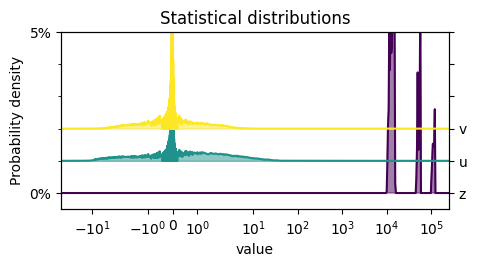
Info: Monthly ERA-Interim data. Downloaded and edited by fabien.m...xb.plot_distribution(ds);
NOTE: If you plan to use the example datasets provided by xarray, you will need to install the pooch package separately using the following command:
pip install pooch
Without installing pooch, you will not be able to download and load the example datasets, which may result in errors or unexpected behavior.
Step 1: Get information content per bit#
using xbitinfo.xbitinfo.get_bitinformation()
info_per_bit = xb.get_bitinformation(ds, dim="longitude", implementation="python")

info_per_bit
<xarray.Dataset> Size: 1kB
Dimensions:     (bitfloat32: 32)
Coordinates:
  * bitfloat32  (bitfloat32) <U3 384B '±' 'e1' 'e2' 'e3' ... 'm21' 'm22' 'm23'
    dim         <U9 36B 'longitude'
Data variables:
    z           (bitfloat32) float64 256B 0.0 0.0 0.0 ... 0.005199 0.007699
    u           (bitfloat32) float64 256B 0.7816 0.4274 0.0 ... 0.01148 0.1475
    v           (bitfloat32) float64 256B 0.8752 0.7756 0.0 ... 0.06165 0.05304
Attributes:
    xbitinfo_description:       bitinformation calculated by xbitinfo.get_bit...
    python_repository:          https://github.com/observingClouds/xbitinfo
    julia_repository:           https://github.com/milankl/BitInformation.jl
    reference_paper:            http://www.nature.com/articles/s43588-021-001...
    xbitinfo_version:           0.0.4
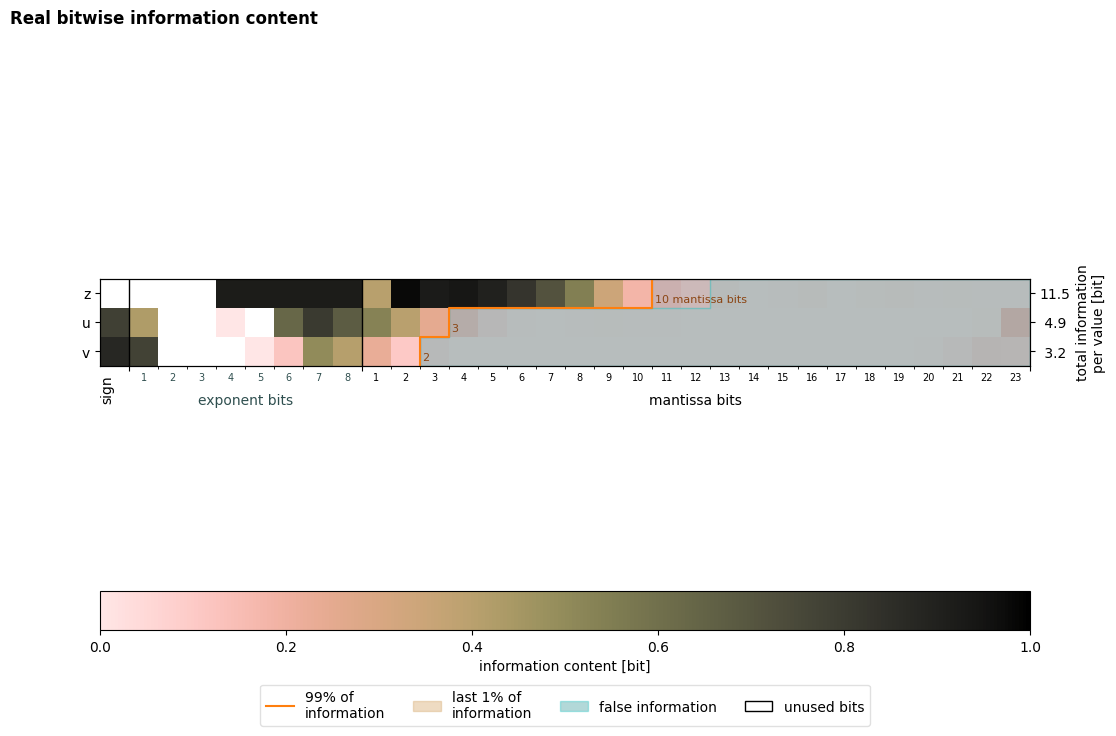
BitInformation.jl_version: 0.6.3Visualize information content#
using xbitinfo.graphics.plot_bitinformation()
fig = xb.plot_bitinformation(info_per_bit)
Step 2: Set keepbits#
Based on the visualization of the bitinformation plotted above, the number of keepbits can be directly obtained or calculated by setting a threshold of real information content to preserve (e.g. 99%) by using xbitinfo.xbitinfo.get_keepbits():
keepbits = xb.get_keepbits(info_per_bit, 0.99)
keepbits
<xarray.Dataset> Size: 68B
Dimensions:   (inflevel: 1)
Coordinates:
    dim       <U9 36B 'longitude'
  * inflevel  (inflevel) float64 8B 0.99
Data variables:
    z         (inflevel) int64 8B 10
    u         (inflevel) int64 8B 3
v (inflevel) int64 8B 2Step 3: Apply bitrounding#
using xbitinfo.bitround.xr_bitround() or xbitinfo.bitround.jl_bitround(). The later does not work with chunked datasets and requires a working installation of Julia.
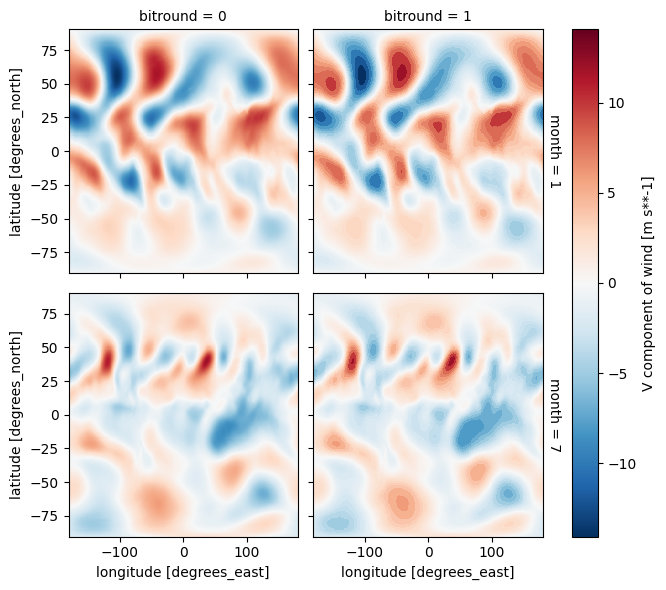
ds_bitrounded = xb.xr_bitround(ds, keepbits)
xr.concat([ds, ds_bitrounded], "bitround").isel(level=0)["v"].plot(
    col="bitround", row="month"
);
Step 4: Apply compression and save dataset#
To leverage the results of bitrounding, the dataset needs to be stored with a (lossless) compression algorithm. Xbitinfo provides two convienience functions that can be used to store the bitrounded dataset into commonly used file formats with default compression settings.
These functions are xbitinfo.save_compressed.ToCompressed_Netcdf and xbitinfo.save_compressed.ToCompressed_Zarr.
NetCDF#
ds_bitrounded.to_compressed_netcdf("bitrounded_compressed.nc")
ds.to_compressed_netcdf("compressed.nc")
ds.to_netcdf("original.nc")
!du -hs *.nc
7.5M	0.air_original.nc
532K	bitrounded_compressed.nc
4.1M	compressed.nc
8.0M	original.nc
!rm *.nc
Zarr#
ds_bitrounded.to_compressed_zarr("bitrounded_compressed.zarr", mode="w")
ds.to_compressed_zarr("compressed.zarr", mode="w")
ds.to_zarr(
    "original.zarr", mode="w", encoding={v: {"compressors": None} for v in ds.data_vars}
);
/home/docs/checkouts/readthedocs.org/user_builds/xbitinfo/envs/v0.0.4/lib/python3.12/site-packages/zarr/core/group.py:2703: ZarrUserWarning: The `compressor` argument is deprecated. Use `compressors` instead.
  compressors = _parse_deprecated_compressor(
/home/docs/checkouts/readthedocs.org/user_builds/xbitinfo/envs/v0.0.4/lib/python3.12/site-packages/zarr/api/asynchronous.py:244: ZarrUserWarning: Consolidated metadata is currently not part in the Zarr format 3 specification. It may not be supported by other zarr implementations and may change in the future.
  warnings.warn(
!du -hs *.zarr
832K	air_bitrounded.zarr
1.1M	air_bitrounded_by_chunks.zarr
7.9M	air_compressed.zarr
1.1M	bitrounded_compressed.zarr
5.0M	compressed.zarr
11M	original.zarr
!rm -r *.zarr